The State of Web Accessibility in 2026: Why 96% of Websites Are Still Failing
Have you ever tried using a website with your eyes closed? Or navigating a checkout form using only your keyboard? If you haven't, you probably don't realise how broken most of the web actually is for the 1.3 billion people worldwide living with a disability. And the data backs this up in a way that's genuinely hard to ignore.
Every year, WebAIM publishes their Million report — an automated accessibility audit of the top one million homepages on the internet. The 2025 results found that 96.3% of homepages had detectable WCAG failures. Not obscure, edge-case issues. Basic, fundamental failures that prevent real people from using real websites.
That number has barely moved in five years. And honestly, I think that's a problem the industry needs to take far more seriously.
What the Data Actually Shows
Let's dig into the WebAIM Million numbers, because they paint a very clear picture of where things are going wrong.
The most common failures aren't exotic technical issues — they're the basics:
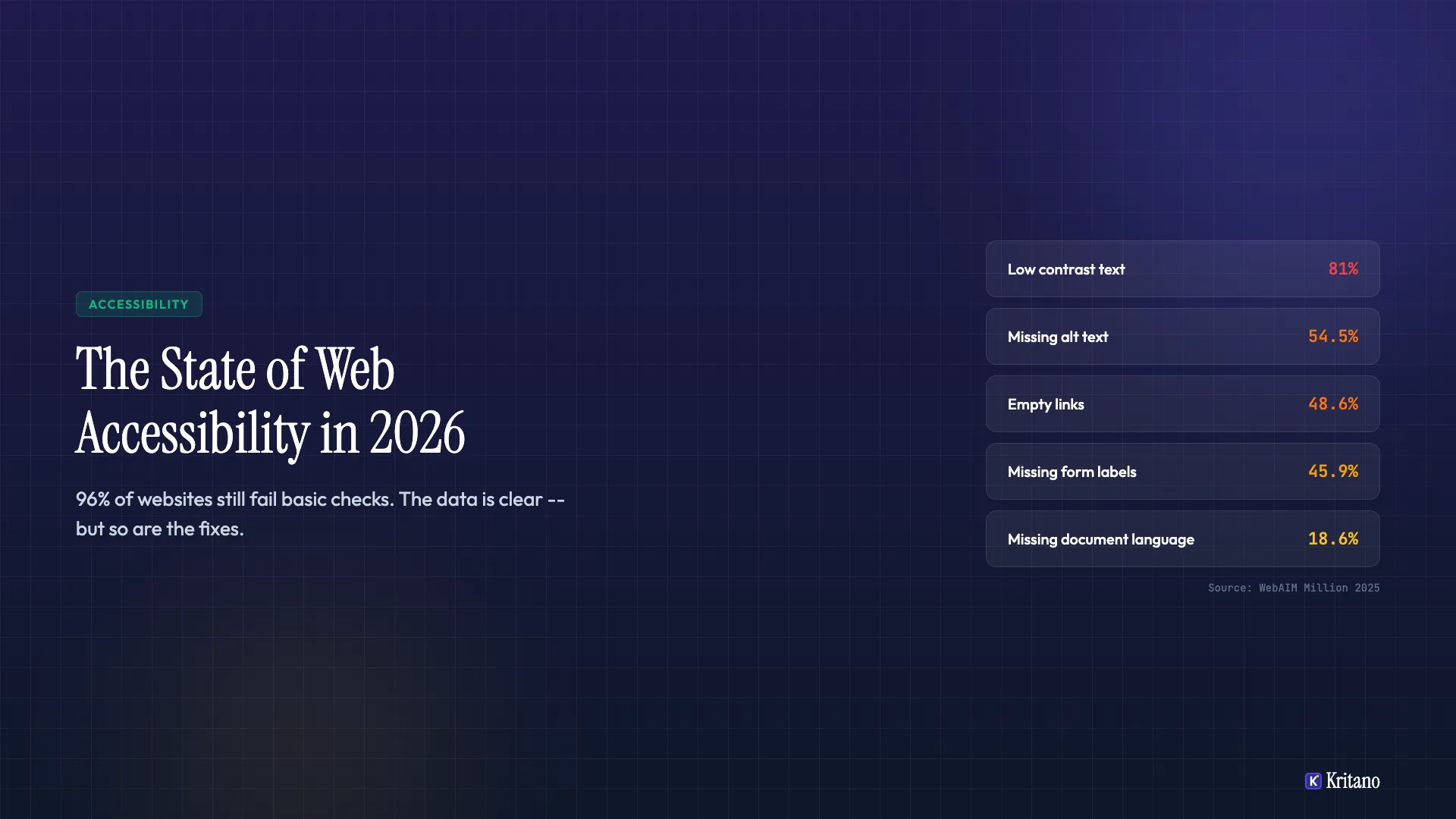
- Low contrast text — found on 81% of homepages. That's text that's difficult to read for anyone with low vision, and let's be honest, it's hard for the rest of us too in bright sunlight
- Missing alt text on images — 54.5% of all images lacked alternative text. Screen readers hit these and just say "image" — completely useless
- Empty links — 48.6% of pages had links with no accessible name. Imagine hearing "link, link, link" with no idea where any of them go
- Missing form labels — 45.9% of form inputs weren't properly labelled. Try filling in a form when you can't tell which field is asking for your name and which wants your email
- Missing document language — 18.6% of pages didn't declare a language, which means screen readers don't know whether to read the page in English, French, or Mandarin
Here's what strikes me about this list — none of these are difficult to fix. Low contrast text is a CSS change. Alt text is a few words per image. Form labels take minutes. These aren't complex engineering problems. They're oversights, and they're happening at a staggering scale.
The Regulatory Landscape Has Changed — Significantly
Here's where things get interesting for businesses in the UK and Europe, because the legal ground has shifted dramatically.
The European Accessibility Act (EAA)
The EAA comes into full force in June 2025, and it's a game-changer. It requires that digital products and services — including websites and mobile apps — meet accessibility standards. This isn't limited to public sector organisations. If you're selling products or services to consumers in the EU, this applies to you. E-commerce, banking, travel, telecommunications — all covered.
The standard it references is EN 301 549, which maps closely to WCAG 2.1 Level AA. If your website doesn't meet that bar, you're potentially non-compliant with EU law.
The Public Sector Bodies Accessibility Regulations (PSBAR)
In the UK, PSBAR has been in effect since 2018, requiring all public sector websites and apps to meet WCAG 2.1 Level AA. The regulations include a requirement to publish an accessibility statement — and the Government Digital Service (GDS) has been actively monitoring compliance. If you're building for local authorities, NHS trusts, or government bodies, this isn't optional. It's been law for years.
The ADA and Litigation Trends
Across the Atlantic, the Americans with Disabilities Act continues to drive a massive volume of accessibility lawsuits. In 2024, there were over 4,600 web accessibility lawsuits filed in the US — and that number has been climbing year on year. While the ADA doesn't explicitly mention websites, courts have consistently interpreted "places of public accommodation" to include digital spaces.
The key takeaway? Accessibility isn't just a nice-to-have anymore — it's a legal requirement in most major markets. And the enforcement is only getting stricter.
The Cost of Ignoring It vs the Cost of Fixing It
I hear this concern a lot: "Making our website accessible sounds expensive." But in my honest opinion, the cost of not doing it is almost always higher.
The Cost of Non-Compliance
- Legal action — accessibility lawsuits in the US average $25,000-$75,000 in settlements, and that's before legal fees. In the EU, fines under the EAA are set by individual member states but can be substantial
- Lost revenue — the disability community represents over $13 trillion in annual disposable income globally (the "Purple Pound" in the UK alone is worth approximately $309 billion). If your website excludes them, that's revenue you're leaving on the table
- Brand damage — being publicly called out for inaccessible services is a reputational risk that no marketing budget can easily undo
- SEO impact — many accessibility best practices overlap directly with SEO. Missing alt text, poor heading structure, and broken links hurt your search rankings too
The Cost of Fixing It
Here's the thing — fixing accessibility issues is far cheaper than most businesses expect, especially when you catch them early:
- Automated remediation of the most common issues (contrast, alt text, labels, language declaration) can often be done in a matter of hours, not weeks
- Building accessibly from the start adds roughly 1-2% to a project's development cost. Retrofitting is more expensive, but even then, the most impactful fixes are usually straightforward
- A proper accessibility audit identifies the highest-impact issues so you can prioritise. You don't need to fix everything at once — start with what affects the most users
The maths is simple. A few hours of developer time fixing contrast ratios and form labels costs infinitely less than a single lawsuit or a year of lost customers.
The Quick Wins: An Actionable Checklist
If you're reading this and thinking "right, where do I start?" — here's a checklist of the fixes that address the most common failures. These are the changes that will make the biggest difference for the least effort.
Contrast and Colour
- Check all text meets a 4.5:1 contrast ratio against its background (3:1 for large text)
- Don't rely on colour alone to convey meaning — add icons, text labels, or patterns
- Test your site with a contrast checker like the WebAIM Contrast Checker or the built-in Chrome DevTools audit
Images and Media
- Add descriptive alt text to every meaningful image — describe what the image shows, not just "image of..."
- Mark decorative images with an empty alt attribute (
alt="") so screen readers skip them - Ensure videos have captions and audio content has transcripts
Forms
- Every input field must have a visible, associated label — not just placeholder text
- Error messages should be specific ("Please enter a valid email address" not just "Invalid input")
- Ensure the form can be completed entirely with a keyboard — tab through it yourself and check
Navigation and Structure
- Set the document language in your HTML (
<html lang="en">) - Use a logical heading hierarchy — one H1, then H2s, then H3s. Don't skip levels
- Ensure all links have descriptive text — "Read our accessibility guide" not "Click here"
- Add skip navigation links so keyboard users can jump straight to the main content
Interactive Elements
- Every clickable element must have a visible focus indicator — don't remove the outline
- Ensure modals, dropdowns, and menus are keyboard accessible and can be closed with Escape
- Don't use auto-playing media or animations that can't be paused
Testing
- Run your site through Lighthouse (built into Chrome) or axe DevTools for a quick automated check. These are great for single-page checks. For site-wide accessibility scanning, see how the leading tools compare.
- Navigate your entire site using only your keyboard — can you reach everything?
- Test with a screen reader at least once — VoiceOver on Mac, NVDA on Windows (both free)
My Take
The fact that 96% of websites are still failing basic accessibility checks in 2026 isn't a technology problem — it's an awareness and priority problem. The tools exist. The standards are clear. The legal requirements are in place. What's missing is the willingness to treat accessibility as a fundamental part of building for the web, not an afterthought you bolt on before launch.
I've seen firsthand how even small improvements — fixing contrast, adding form labels, sorting out heading structure — can transform the experience for users who rely on assistive technology. And almost every time, those fixes improve the experience for everyone else too.
If you're not sure where your website stands, get in touch for an accessibility audit. I'll walk you through exactly what needs fixing, what to prioritise, and how to get there without it costing an arm and a leg.

Founder of Kritano
5 years in web development. I specialise in web auditing, WCAG 2.2 compliance, and search engine optimisation.
I built Kritano after years of running audits with fragmented tools. I write about SEO, accessibility, security, and performance based on real auditing data from thousands of scans.